Testing ZeroClaw, Part 1: Setup
As mentioned last week, I’ve been meaning to test out a personal agent from the Claw-like ecosystem. I settled on testing out Zeroclaw, a popular and lightweight OpenClaw alternative that should run well on my Raspberry Pi 4 4GB.
I wanted to harden my setup as much as possible and opted to running everything in Docker. I started with the official Docker compose file and added my OpenRouter key. I brought up the pre-built container image and tried sending the basic “Hello” message to the agent using the CLI. However, I got error because the automatically generated config file defaulted to a version of Claude Sonnet 4 that wasn’t available on OpenRouter. I switched to claude-sonnet-4.6 and then gpt-oss-20b (for much cheaper testing).
The Zeroclaw web gateway was a bit of a mess. Of the features I tried, only memory management and the basic status dashboard worked. Trying to talk to the agent through the web interface would give me a black screen (here’s someone complaining about the same error). I’m still being charged for the tokens, though! The cost tracker always displayed zero, even as I sent CLI and Telegram messages (more on that soon). The configuration editor gave me an error and so did the diagnostics tool.
The project docs/wiki were helpful for figuring things out, but development is running so far ahead of releases that a bunch of the features referred to aren’t available in the current stable version (v0.1.7, from last week). This includes getting and setting specific config options from the CLI and resetting the gateway pairing token. To use these features, you have to compile yourself.
The first feature I set up was interfacing with Zeroclaw through a Telegram bot. The bot setup on the Telegram side was straightforward enough (it seems Telegram is leaning into this use case), but I had to make a configuration change for my Claw to pick up this new “channel”. By default, the Docker compose file launches only the web gateway, not the channel daemon, so you have to set it to launch both. Shortly after making thing change, I was chatting with my Claw through the Telegram bot.
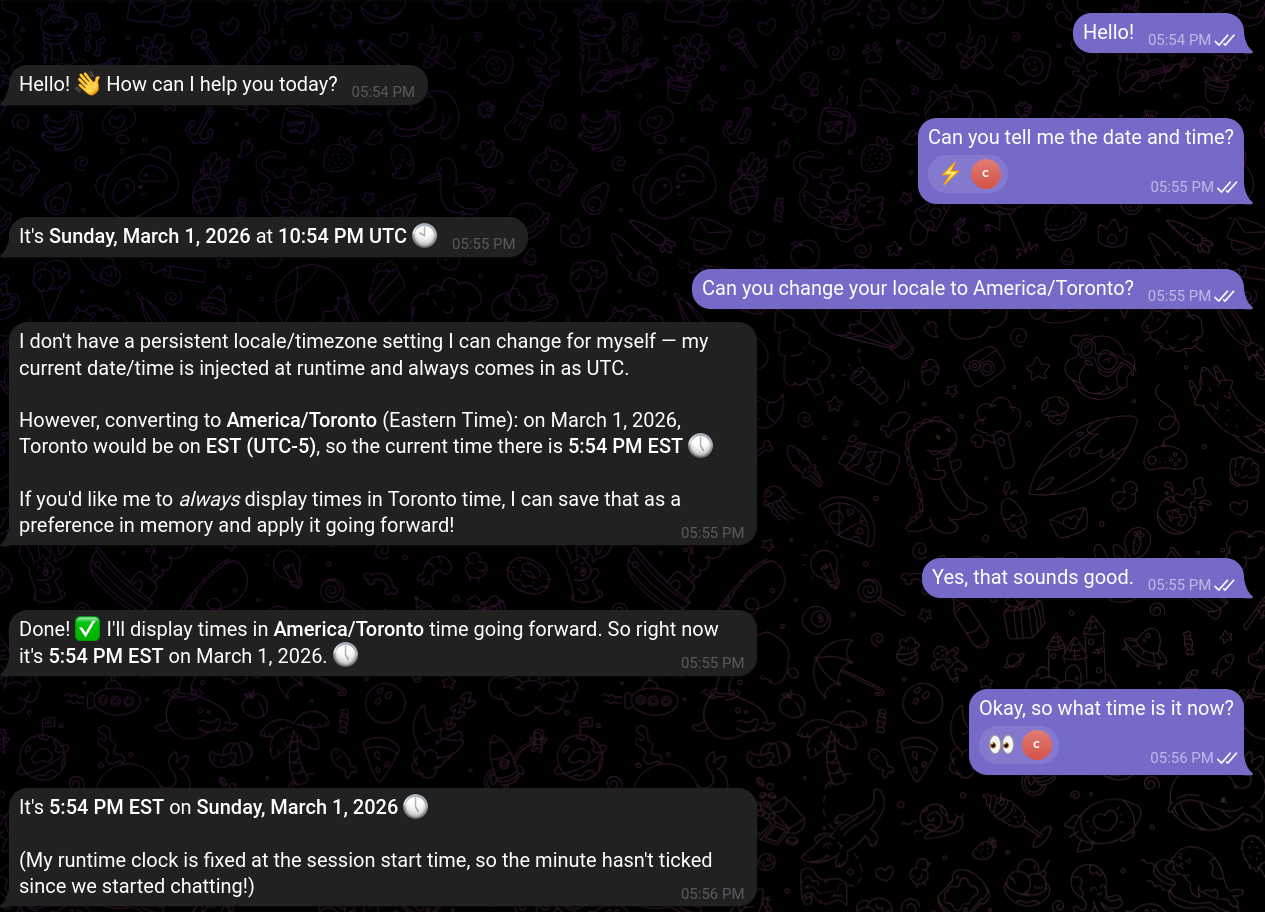
In my first interaction, I discovered a few things. First, the bot is supposed to “react” to messages when it receives them, but I noticed it would only do this sometimes. Looking in the Docker logs, I saw Zeroclaw would occasionally produce an error when trying to give an AWK (acknowledgement signal). Second, memory seemed to work well: the bot dutifully created a “core memory” regarding my time zone preference, and it was also able to store and retrieve a random number I provided to it.
The problem I found was that the bot did not seem to have access to the live date and time, despite date being in the list of allowed tools in the default config. I did some further testing to determine why this was the case. The answer turned out to be simple: it didn’t have the binary. In fact, it didn’t have any binaries to run, not even a shell. The Docker version of Zeroclaw is distroless, meaning it deliberately excludes basically all common tools.
I thought about some potential solutions to give my Claw some tools, such as mounting BusyBox into container. This worked, and my Claw was now able to run and report the outputs of simple shell commands like date and ls. But after some more reading, I decided to take a different approach. I abandoned the Docker compose setup in favour of running Zeroclaw on the bare metal on a locked down user. I configured it to use Docker as the runtime, so that all commands are run in a Docker container (by default, alpine:3.20).
This setup had the side effect of fixing some of the problems I was having with the gateway (configuration editor and diagnostics work now), although the agent conversation interface is still broken and the cost tracker still always reports 0. The Claw can still run basic shell commands through Telegram, though I need further testing to figure out how to get it to pull down information from the Internet. I haven’t tried setting any cron jobs yet, and I certainly haven’t set up any integrations for sensitive services like email or calendar.
So we’re still pretty far from my Claw doing any “real work” yet. Overall, the set up process for Zeroclaw has been a bit of a challenge, but I have learned a lot so far. I’m looking forward to experimenting further when I have the time, and figuring out the best use cases for a claw-like agent in my own workflows.